
Have you ever tried to upload a picture to a website and got an error?
Maybe the file was too big.
Maybe the format was wrong.
This is a problem many people face every day.
That is why we built the Image Converter Tool on TagCraftLab.
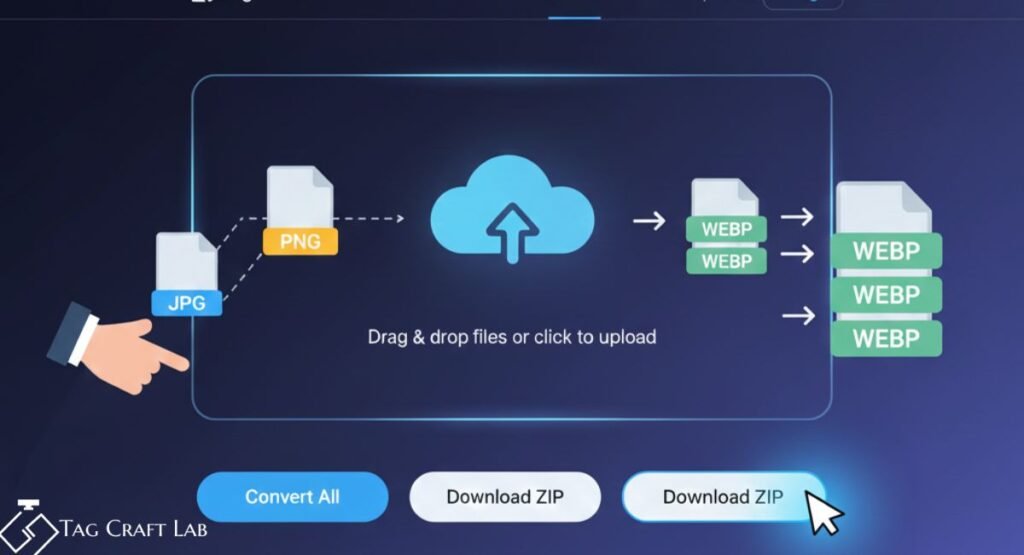
With this free tool, you can change your image format in seconds. You do not need to install anything. You do not need design skills. Just drag your images, click a button, and download them.
What Is the Image Converter Tool
The Image Converter Tool is an online tool that changes your image files from one format to another.
It supports these formats.
JPG
JPEG
PNG
WEBP
BMP
GIF
You can upload many images at once and convert them all together. You can even download them as a ZIP file.
Why People Need an Image Converter Tool
Images are everywhere. On websites, in blogs, on social media, in school projects, and business files.
But not all platforms accept every format.
Here are some real problems people face.
A website only allows JPG but you have PNG.
Your image is too heavy and slows your website.
Your phone saves pictures in HEIC but your PC cannot open them.
Your blog needs WEBP for better speed.
This is where the Image Converter Tool becomes very useful.
Key Features of TagCraftLab Image Converter Tool
This tool is made for beginners and professionals.
1. Drag and Drop Upload
Just drag your images into the box. No forms. No steps.
2. Convert All Images at Once
Upload many files and convert all with one click.
3. Convert to WEBP Option
You can convert all images to WEBP format which is best for website speed.
4. Download ZIP File
After converting, download all images in one ZIP file.
5. No Signup Needed
Use the Image Converter Tool without creating any account.
6. Works on Any Device
Use it on laptop, tablet, or mobile.
How to Use the Image Converter Tool
Using this tool is very easy.
Step 1
Open TagCraftLab Image Converter page.
Step 2
Drag your images into the upload area.
Step 3
Choose convert to WEBP or click Convert All.
Step 4
Click Download ZIP.
That is it. Your images are ready.
Best Use Cases for This Tool
For Bloggers
Bloggers need light images for fast pages. Convert images to WEBP and make your blog faster.
For Students
Change images for school projects or presentations.
For Website Owners
Fix format problems and optimize website speed.
For Social Media Users
Convert images to supported formats for Facebook, Instagram, and more.
Why WEBP Is Better Than JPG and PNG
WEBP is a modern image format made by Google.
It keeps image quality high but file size low.
Smaller images mean.
Faster website
Better SEO
More visitors stay on your page
This is why the Image Converter Tool gives you a one-click WEBP option.
How This Tool Helps Your SEO
Google loves fast websites.
Large images slow your site and hurt rankings.
By converting your images to WEBP using the Image Converter Tool, you improve.
Page speed
User experience
Search ranking
This makes your website more successful.
Is This Tool Safe to Use
Yes.
Your files are not saved permanently.
No personal data is required.
Your images stay private.
Image Converter Tool vs Other Online Tools
Many tools online are slow, full of ads, or ask for login.
TagCraftLab Image Converter Tool is different.
It is fast.
It is clean.
It is free.
It is made for real users.
Frequently Asked Questions
What formats does the Image Converter Tool support
It supports JPG, JPEG, PNG, WEBP, BMP, and GIF. You can convert between these formats easily.
Can I convert many images at the same time
Yes. You can upload multiple images and convert them all together. You can download them in one ZIP file.
Is the Image Converter Tool free
Yes. The tool is 100 percent free. No signup and no hidden charges.
Why should I convert images to WEBP
WEBP files are smaller and faster. They help your website load quickly and improve SEO.
Does this tool work on mobile
Yes. You can use the Image Converter Tool on any device.
Final Words
Images are important.
But heavy images can slow your work.
The Image Converter Tool on TagCraftLab makes everything simple.
Upload. Convert. Download.
No stress. No cost. Just results.
Start using it today and make your images perfect in seconds.
Frequently Asked Questions About Image Converter Tool
What is an Image Converter Tool
An Image Converter Tool is an online tool that changes your picture files from one format to another. For example, it can turn JPG into PNG or PNG into WEBP. This helps when a website or app only accepts a certain image type.
Which image formats are supported
The TagCraftLab Image Converter Tool supports JPG, JPEG, PNG, WEBP, BMP, and GIF formats. You can upload any of these formats and convert them easily with just one click.
Can I convert many images at the same time
Yes, you can upload multiple images together. The tool will convert all files at once and give you a single ZIP file to download. This saves a lot of time.
Why should I convert images to WEBP format
WEBP images are much smaller in size but keep good quality. Smaller images make your website load faster and improve SEO rankings on Google.
Is the Image Converter Tool free to use
Yes, the Image Converter Tool on TagCraftLab is completely free. You do not need to sign up or pay any money to use it.
Is my data safe when using this tool
Yes, your images are not saved permanently. The tool processes your files and lets you download them safely without storing your personal data.